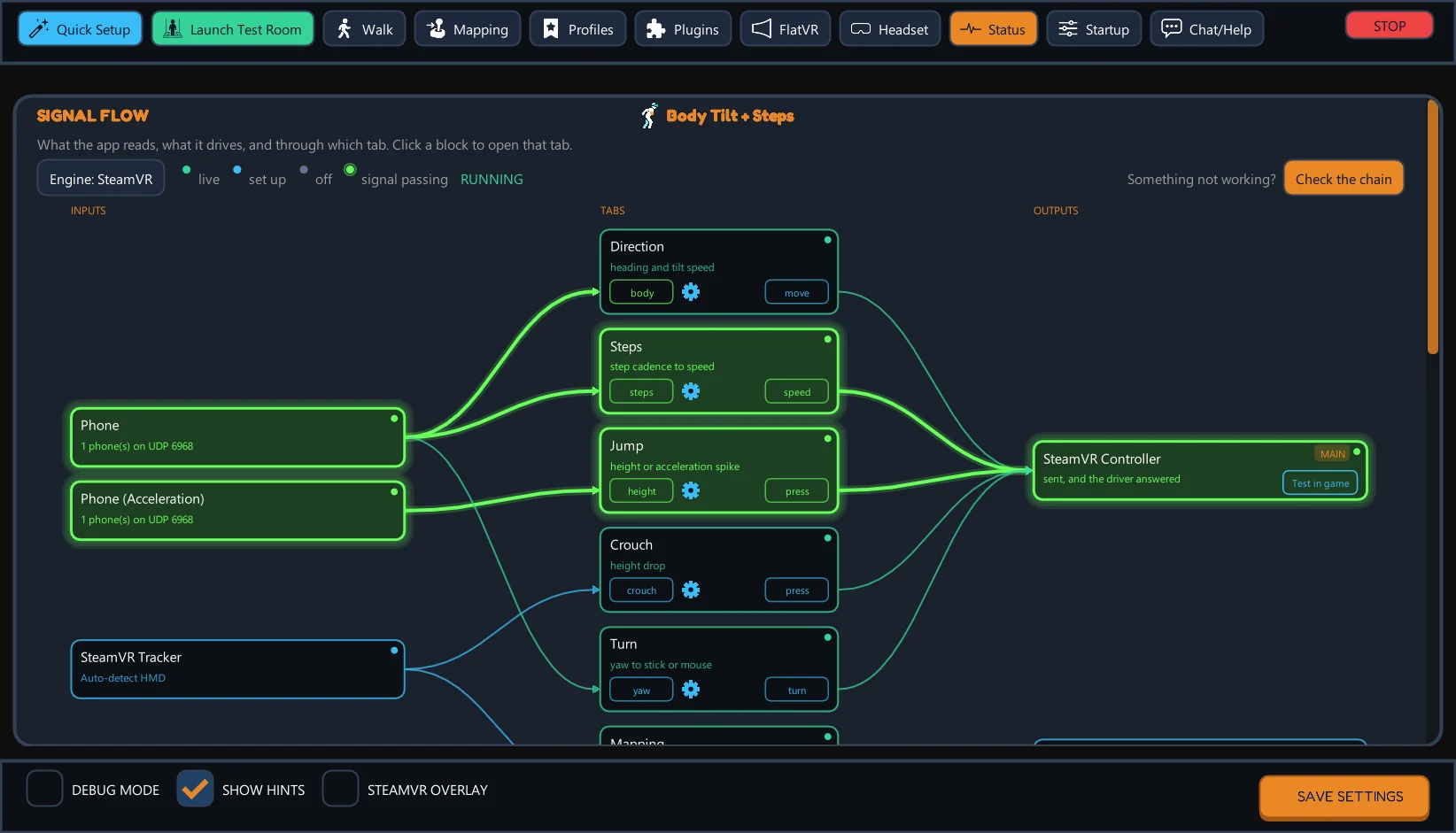
One page that shows the whole path from your body to the game - which device feeds which tab, and where the result goes - and lights up where a signal really passes. When something does not work, open it first: the place where the colour stops is the thing to fix.
The map has three columns, joined by lines from each device, through the tab that uses it, to the output it reaches. The title above it names the kind of walking your settings add up to, for example Body Tilt + Steps.
Beside the colours, RUNNING or STOPPED is the state of the whole app - what the START button switches. While it says STOPPED nothing is sent to the outputs, so only the inputs can light up. See Start and stop without the mouse.
Engine, at the top left of the map (for example Engine: SteamVR), is the VR runtime the whole chain is pointed at - the same choice as the Engine list on Walk › Main. Changing it here moves every input and output that belongs to a runtime at once; a phone, SlimeVR and USB devices are left alone. Which Engine your game needs: Engine.
Check the chain, at the top right beside "Something not working?", goes through the chain one link at a time and stops at the first broken one, with what to do:
Each output block has Test in game. It drives that output by itself - forward, back, right, left, two seconds each, then back to the centre - while you watch the character in your game. No tracker needed, and your own movement is kept off the output while it runs. Press it again to cancel; STOP or leaving the tab cancels it too. If the character moves, the output works and any problem is on the input side; if not, the game is not listening to this output.
Under the map, every port BodyWalkVR listens on, with its protocol: Phone (owoTrack) (UDP 6968), SlimeVR (SolarXR) (TCP 21110), SteamVR Hook (UDP 4445) and the two Test Room ports.
The installer and portable versions also have tools\Fix_All_Firewalls.bat (right-click, Run as administrator), which opens every port at once. The Steam version has no tools folder.
tools\Fix_All_Firewalls.bat